Region Behaviours
Low automation for spells, features, items and monster abilities that place an area of effect.
Overview
In Foundry v14 and D&D 5e 6.0, area templates are regions, and an activity can attach behaviours to the region it places. DDB Importer adds its own activity behaviour, the DDB Importer Trigger, and fills it in for you when it imports content such as Spirit Guardians, Moonbeam, Spike Growth, Cloudkill, Web and many monster auras.
When a token triggers one of these regions (entering it, starting or ending its turn in it, moving through it), DDB Importer posts the right activity to chat against that token. For example, the Spirit Guardians save card targets the creatures that walked into the emanation.
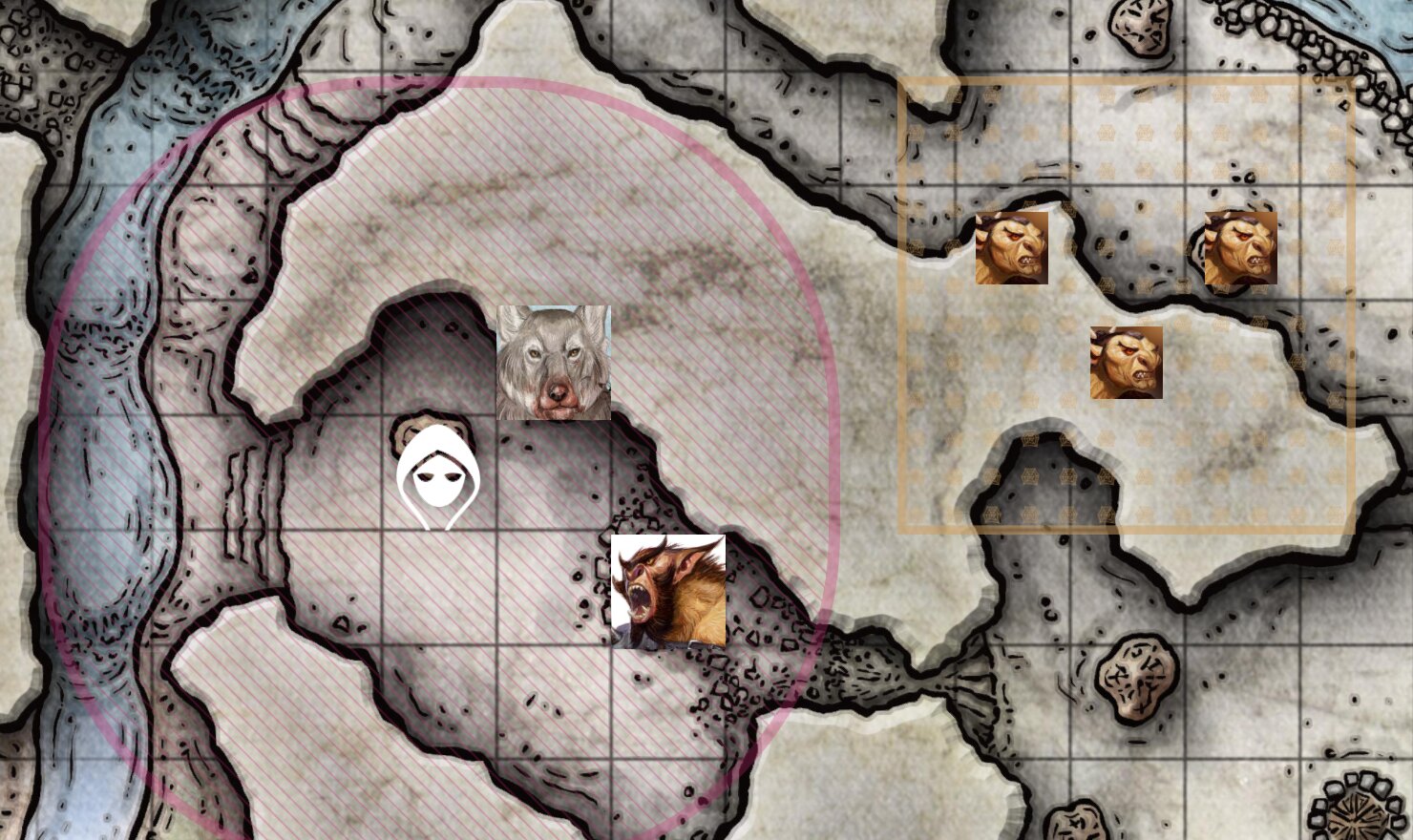
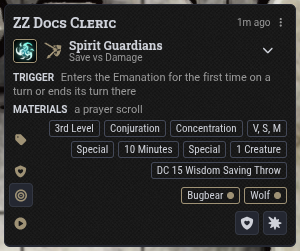
By default the trigger posts the activity's normal chat card with its save and damage buttons, and the triggering tokens are set as the card's targets. Players and the GM still click to roll. If you use midi-qol or a similar automation module, the trigger hands the activity to midi-qol instead, but you may prefer to turn DDB Importer's triggers off and let that module handle areas.
A few things to know:
- A GM must be connected. Triggers run on the active GM's client, so nothing fires when no GM is logged in.
- Allies and enemies are respected. An activity that targets enemies only fires for tokens hostile to the token that placed the region, and one that targets allies only fires for friendly tokens. Neutral tokens count as neither.
- Once per turn. Most triggers fire once per token per combat turn, so a creature that leaves and re-enters Spirit Guardians is not asked to save twice.
- Upcasting is kept. A spell cast with a higher level slot keeps its upcast damage when the region fires later.
- No resources are spent. The triggered activity does not use spell slots, uses or actions, and it does not restart concentration.
Settings
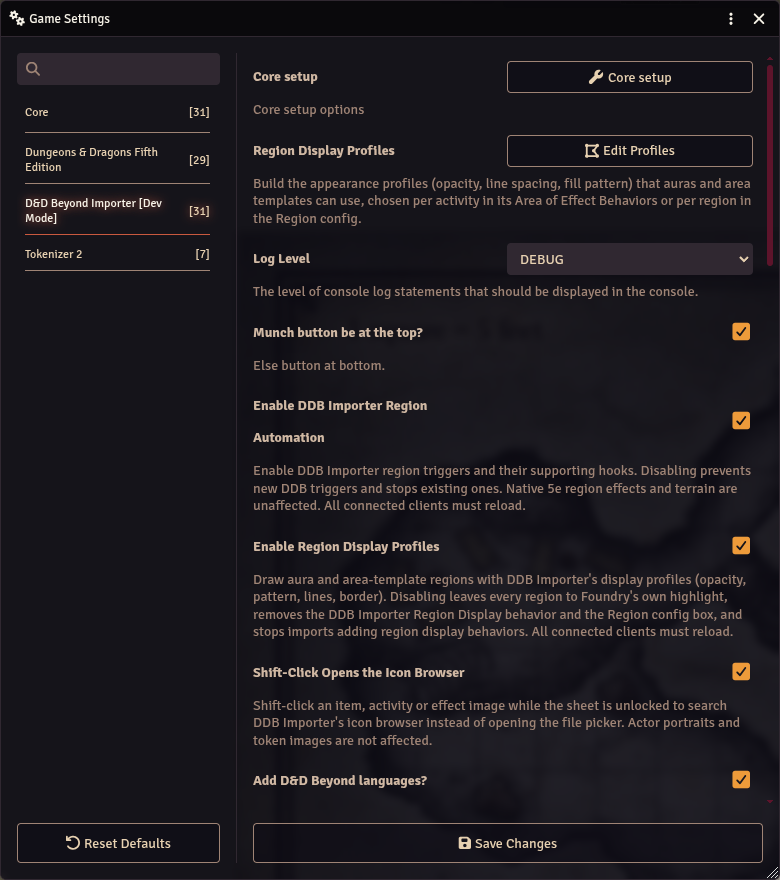
The master switch is in Configure Settings > D&D Beyond Importer:
- Enable DDB Importer Region Automation: turns the triggers and their supporting hooks on or off. Turning it off stops existing triggers as well as preventing new ones. Native 5e region effects, such as difficult terrain, are unaffected. Every connected client must reload after changing it.
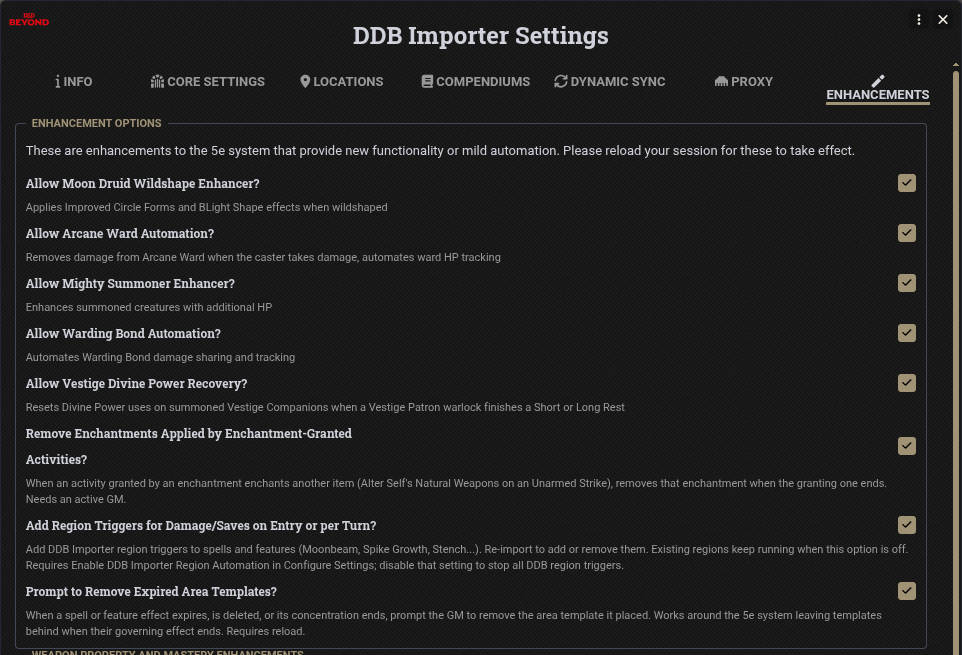
Two more options are in Core setup > Enhancements:
- Add Region Triggers for Damage/Saves on Entry or per Turn?: adds triggers to spells and features when they are imported or munched. You need to re-import to add or remove them. Regions already on a scene keep running when this option is off, so use the master switch above to stop everything.
- Prompt to Remove Expired Area Templates?: see Expired templates below. This is off by default.
Where the triggers live
Open an activity that places an area of effect, go to its Effect tab, and scroll to Area of Effect Behaviors. D&D5e only shows this section for activities with an area, or for riders.
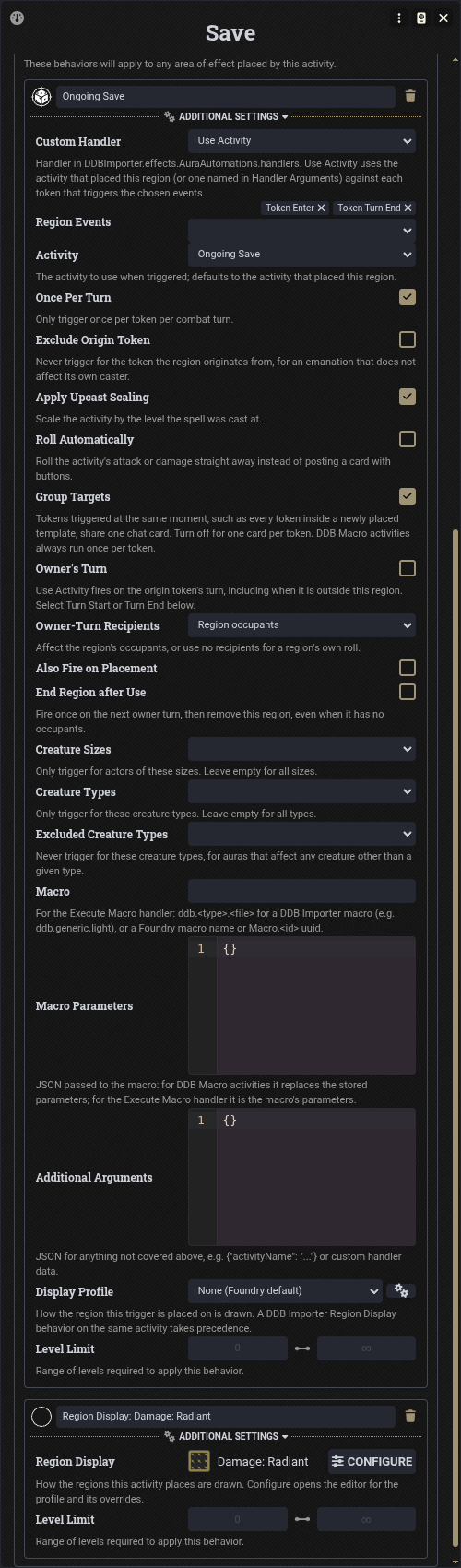
Imported content names each trigger after the activity it fires (here "Ongoing Save"). Use the + button to add your own; pick DDB Importer Trigger as the type. Expand Additional Settings to see its options.
When the activity places its area, each trigger becomes a regular Foundry Execute Script behaviour on the new region. Changing the activity afterwards does not change regions already on the scene.
Trigger options
| Option | What it does |
|---|---|
| Custom Handler | What happens when the trigger fires. See Handlers. |
| Region Events | The region events that fire it: Token Enter, Token Exit, Token Move In, Token Move Out, Token Move Within, Token Turn Start, Token Turn End, Token Round Start, Token Round End. |
| Activity | The activity to use. Blank means the activity that placed the region. Imported content often points this at a second activity, such as Moonbeam's "Ongoing Save". |
| Once Per Turn | Only fire once per token per combat turn. Outside combat it is once per move. |
| Exclude Origin Token | Never fire for the token that placed the region, for emanations that do not affect their own caster. |
| Apply Upcast Scaling | Use the level the spell was cast at. |
| Roll Automatically | Roll the attack or damage straight away instead of posting a card with buttons. |
| Group Targets | Tokens triggered at the same moment (for example everything inside a newly placed template) share one chat card. Turn it off for one card per token. |
| Owner's Turn | Fire on the turn of the token that placed the region, even when that token is outside it. See Owner's turn triggers. |
| Owner-Turn Recipients | For owner's turn triggers: affect the region's occupants, or no one (for a roll the region makes on its own). |
| Also Fire on Placement | For owner's turn triggers: also fire when the region is first placed. |
| End Region after Use | For owner's turn triggers: fire once on the next owner turn, then delete the region. |
| Creature Sizes | Only fire for these sizes. Empty means all sizes. |
| Creature Types | Only fire for these creature types. Empty means all types. |
| Excluded Creature Types | Never fire for these types, for "any creature other than an undead" wording. |
| Macro | For the Execute Macro handler, the macro to run. See Running a macro. |
| Macro Parameters | JSON passed to the macro. |
| Additional Arguments | JSON for anything else, see Additional arguments. |
| Display Profile | How the placed region is drawn. See Region Display. |
Handlers
- Use Activity: posts the chosen activity against the triggering tokens. This is what almost all imported content uses.
- Execute Macro: runs a macro for each triggering token.
- Notify Owner: whispers "token triggered region (event)." to the GMs and the owners of the actor that placed the region.
Alarm uses this.
Set your own text with
{"message": "..."}in Additional Arguments;{token},{region}and{event}are replaced. - Log Event (Debug): writes the event to the browser console, which is useful when building your own triggers.
Running a macro
Pick Execute Macro as the handler, choose the Region Events, and put the macro in the Macro field. The field accepts:
- a world macro's name, for example
Trap Springs - a world macro uuid, for example
Macro.aBcD1234eFgH5678 - a compendium macro uuid, for example
Compendium.world.my-macros.Macro.aBcD1234eFgH5678 - a DDB Importer macro as
ddb.<type>.<file>, for exampleddb.generic.light
To get a uuid, open the macro and choose Copy Document UUID from the window's header menu, then paste it in.
A pasted @UUID[...]{Name} document link also works as it is.
Compendium macros run straight from the compendium, so there is no need to import them, and editing the compendium copy changes what the trigger runs. Names are only looked up among world macros; to use a macro from a compendium, give its uuid.
The macro runs once per triggering token, and the Once Per Turn, Exclude Origin Token, size and type filters apply as they do for Use Activity.
A Foundry script macro receives these variables:
| Variable | Contents |
|---|---|
targets | An array holding the triggering token's TokenDocument. |
token | The triggering token's uuid string (not the token itself). Use targets[0] for the document. |
actor | The actor whose activity placed the region, or the triggering token's actor if nothing placed it. |
item | The item that placed the region. |
origin | The uuid of the activity that placed the region. |
parameters | The Macro Parameters JSON, as a string. |
macroLabel | The value of the Macro field. |
regionContext | regionUuid, regionName, sceneUuid, behaviorUuid, eventName (for example tokenEnter), tokenUuid, and args, the trigger's full set of arguments. |
For example, with Macro Parameters set to {"damage": "1d4"}:
const target = targets[0];
const { damage } = JSON.parse(parameters ?? "{}");
const roll = await new Roll(damage).evaluate();
await roll.toMessage({
  flavor: `${target.name} triggered ${regionContext.regionName} (${regionContext.eventName})`,
});
DDB Importer macros (ddb. names) get the same information through their usual scope, with the triggering token in scope.targetUuids and the details in scope.regionContext.
Additional arguments
Additional Arguments takes a JSON object for options that do not have their own field:
activityName: use an activity by name rather than picking it in the Activity dropdown.activityChoices: for owner's turn triggers, a list of activity names the owner chooses between when it fires.skipOriginStatuses: for owner's turn triggers, statuses (for example["incapacitated"]) that stop it firing while the region's owner has them.fallbackDuration: with End Region after Use, how many seconds the region lasts if the owner's turn never comes.message: the Notify Owner text.
Anything else you add is passed to the handler unchanged, which is how custom handlers get their settings.
Custom handlers
A world script or module can register its own handler, which then appears in the Custom Handler dropdown:
Hooks.once("ready", () => {
  const { RegionAutomations } = DDBImporter.effects.AuraAutomations;
  RegionAutomations.register("shout", async (context, helpers) => {
    const token = helpers.getEventToken(context);
    if (!token) return;
    ChatMessage.create({
      content: `${token.name} ${context.event.name} ${context.region.name} (volume ${context.args.volume})`,
    });
  }, { label: "Shout" });
});
The handler is called with:
- a context object holding
scene,region,behavior,eventandargs, whereargshas the trigger's options merged with its Additional Arguments - the
RegionAutomationshelpers, includinggetEventToken,matchesTokenFilters,useActivityOnTokensandgetActivity
Handlers only run on the active GM's client, so register yours on the GM's side.
Owner's turn triggers
Some areas act on their owner's turn rather than when creatures move, for example Crown of Horns, the Riptide Crossbow's eruption and many monster damage auras. For these, tick Owner's Turn, use the Use Activity handler, and choose Token Turn Start or Token Turn End as the event.
The trigger then fires on the placing token's turn, wherever that token is. Combatants that are skipped do not fire it, and moving the combat tracker backwards does not replay a turn. D&D5e's own turn reminder for that activity is removed, so you are not prompted twice.
When the activity lets its user pick targets, or activityChoices offers several activities, the owning player is asked to choose. The GM sees a waiting message with Take over and Skip buttons. While the player's dialog is open, the creatures they hover over or tick are highlighted on the canvas. If no player owner is online, the GM gets the dialog directly.
Expired templates
D&D5e does not always remove an area when the spell or effect behind it ends. With Prompt to Remove Expired Area Templates? turned on, DDB Importer tracks the areas placed by activities and offers to remove them when:
- the effect that governs them expires or is deleted
- concentration on the spell ends
- the activity's duration runs out as world time passes
- combat ends
- a scene is viewed with old areas still on it
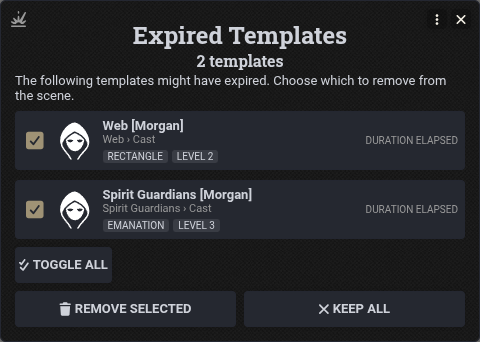
Tick the areas to remove and click Remove Selected, or Keep All. Removing an area also removes the effects its behaviours applied. Areas you keep are not offered again this session.
Two console commands scan on demand:
await DDBImporter.effects.RegionExpiry.scanCurrentScene();
await DDBImporter.effects.RegionExpiry.scanAllScenes();
Troubleshooting
- Nothing happens when a token enters an area. Check that a GM is logged in, and that Enable DDB Importer Region Automation is on. Content imported before this feature, or with Add Region Triggers off, needs to be re-imported.
- "was imported with the retired Active Auras automation": re-import the item or monster to get the new triggers.
- Owner's turn trigger never fires. It needs the Use Activity handler and a Turn Start or Turn End event. Other events are ignored.