DDB Maps
DDB Maps is the VTT inside D&D Beyond.
There is integration with DDB Maps in order to insert map scenes into Foundry very quickly. This feature is available to Undying and higher tier Patreon supporters.
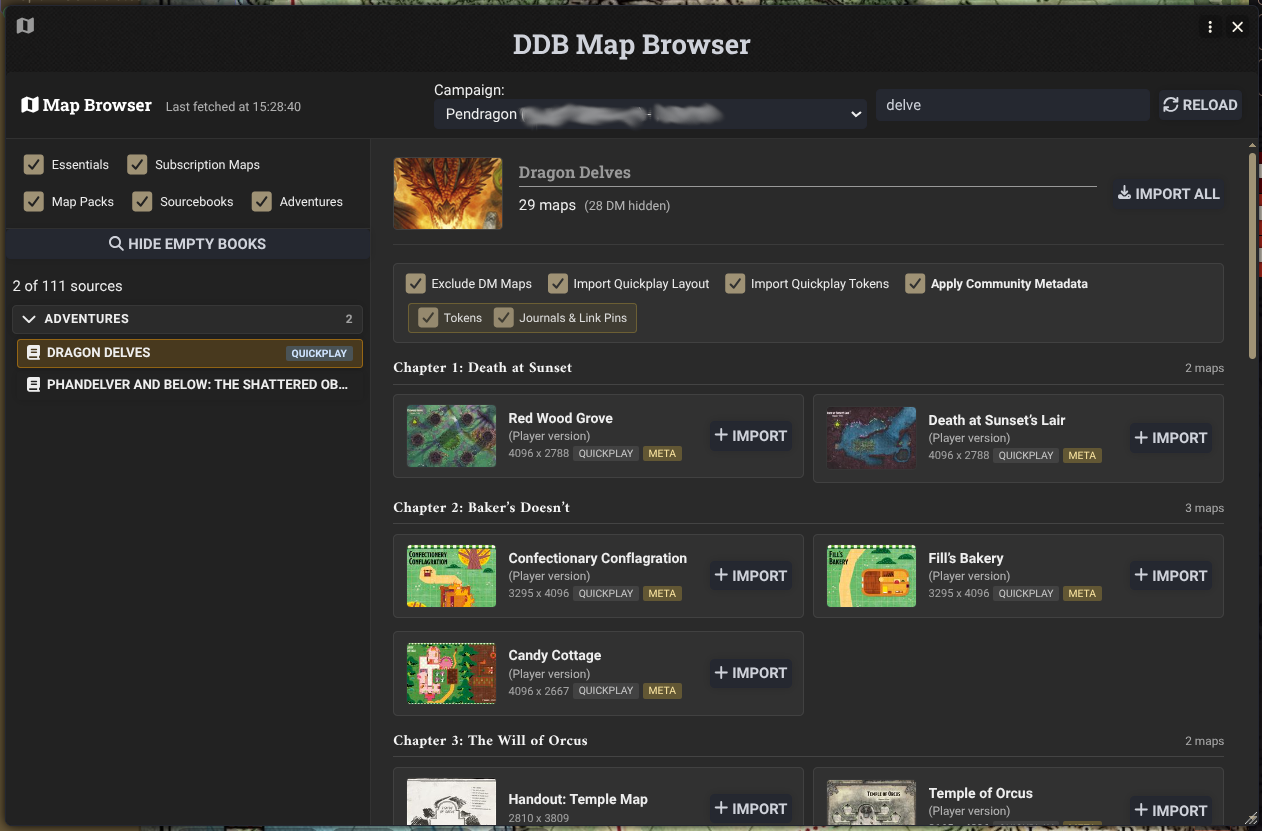
Open the DDB Muncher, select Munch -> Maps and click Open Map Browser. You will need to select a campaign on DDB to access your maps. Maps are imported directly into your world, not a compendium, so remember that large numbers of scenes in your world will impact performance.
It uses the same data that Adventures use, so if we have wall and light information they will be placed.
Some DDB Maps are setup with "Quickplay". This has tokens and stickers already applied to the map, and if they are present you can have DDB Importer use that data. If there is no meta data, DDB Importer does some analysis to try and determine the grid.
Auto Grid Aligner
DDB Importer will also try to auto align the grids of maps coming in via DDB Maps using the scaling information and investigating the image to try and find tell tale patterns of grid lines using some clever maths.
You can right click on (any) scene to kick off the grid aligner. Results vary.