Encounters
How to import Encounters from the D&D Beyond Encounter Builder.
Availability
The Encounter Muncher is available to Patreon supporters.
Prerequisites
Ensure you have done the initial setup and imported Spells and Items.
Encounters use the monsters in your DDB Monsters compendium, so it helps to munch your monsters first.
Open the Encounter Muncher
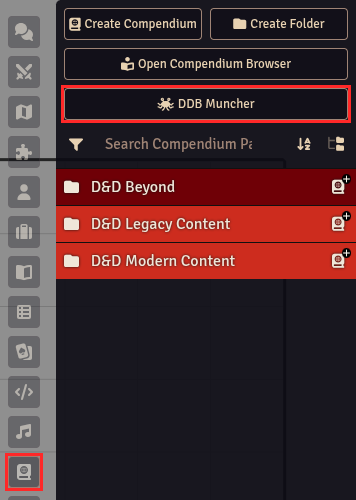
On the right hand side of Foundry click the Compendium section (looks like a book with a world on it). Then click DDB Muncher.
Select Munch -> Encounters.
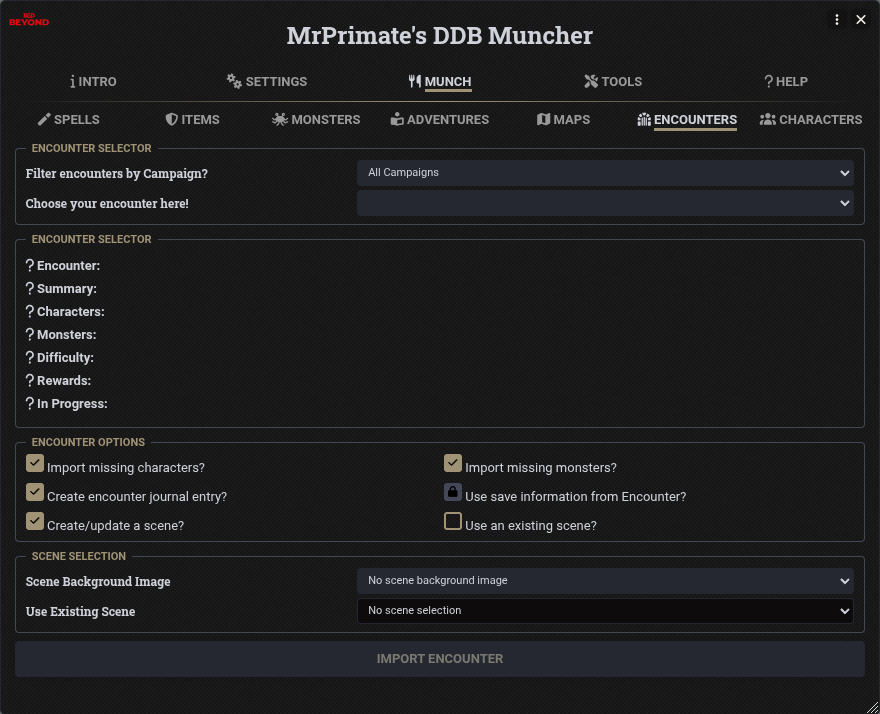
Choosing an Encounter
- Filter encounters by Campaign? Only list encounters from the selected D&D Beyond campaign, or leave it on All Campaigns.
- Choose your encounter here! Pick the encounter you built in the D&D Beyond Encounter Builder.
Once an encounter is selected, its summary, characters, monsters, difficulty, rewards and progress are shown so you can check it is the right one.
Encounter Options
- Import missing characters? Imports any characters in the encounter that are not yet in your world.
- Import missing monsters? Munches any monsters in the encounter that are not yet in your DDB Monsters compendium.
- Create encounter journal entry? Adds a page for the encounter to the "DDB Encounters" journal, with the summary, monsters, difficulty, description and rewards.
- Use save information from Encounter? Uses the monster hit points and initiative from an encounter that is in progress on D&D Beyond. This option is currently locked.
- Create/update a scene? Creates a scene for the encounter and places the characters and monsters on it.
- Use an existing scene? Places the characters and monsters on a scene already in your world.
Scene Selection
- Scene Background Image The background image to use when creating a new scene.
- Use Existing Scene The scene to use when Use an existing scene? is ticked.
Importing
Click Import Encounter.
The monsters are added to your world in a folder named after the encounter, inside a "D&D Beyond Encounters" folder. The journal and any new scene are also placed in "D&D Beyond Encounters" folders. If a scene is created or used, a combat is set up on it with the characters and monsters added to the tracker.