Dynamic Sync
Sync character changes back to D&D Beyond as they happen.
Availability
Dynamic Sync is available to Undying and higher tier Patreon supporters.
Rough
This feature is ROUGH around the edges, and there is a good chance it won't work for every change. If you just want to send changes occasionally, use Update D&D Beyond on the Character Manager instead.
How it works
- Only a single GM user can sync to D&D Beyond, and it only syncs changes detected while that user is connected.
- That user needs permission to write to all of the characters on D&D Beyond. This will likely mean they are the DM of the campaign on D&D Beyond.
- Make sure the characters have been recently imported or updated before you turn Dynamic Sync on.
- Dynamic Sync must be enabled in the settings and on each character.
Enable Dynamic Sync
Open the DDB Importer module settings, click Core setup and select the Dynamic Sync tab.
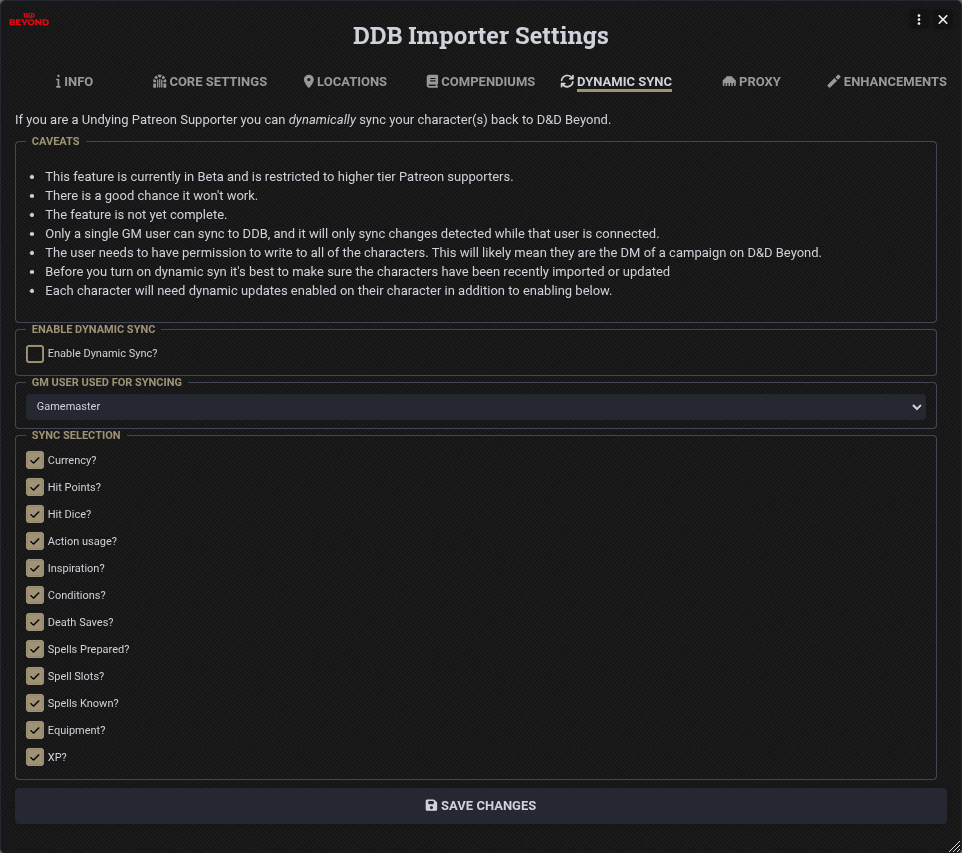
- Enable Dynamic Sync? Turns the feature on.
- GM User used for Syncing The GM user whose session sends the changes to D&D Beyond.
- Sync selection Choose which changes are synced: currency, hit points, hit dice, action usage, inspiration, conditions, death saves, spells prepared, spell slots, spells known, equipment and XP.
Click Save Changes.
Enable a Character
Log in as the GM user selected above and open the character's Character Manager. On the Update D&DBeyond tab tick Enable Dynamic Updates to D&D Beyond?.
Repeat this for each character you want to sync.