Introduction
Tokenizer 2
Tokenizer 2 has not yet been released. It's coming soon. Sounds exciting. Join my Patreon for early access.

Overview
A layered, non-destructive token image editor for Foundry VTT.
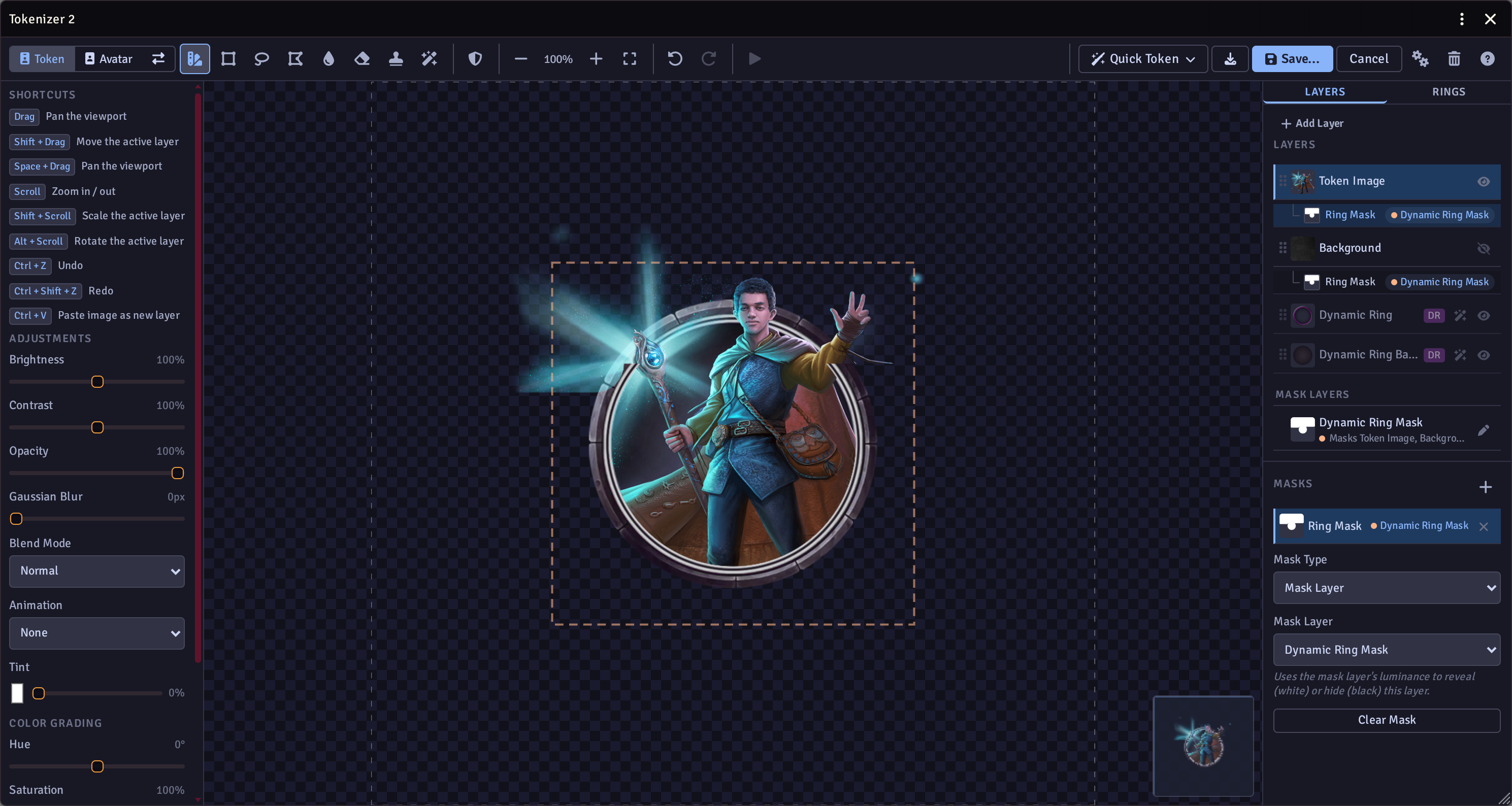
Click any actor portrait to open the editor, compose a token from multiple image layers, frames, and rings, then export the result as a high-resolution PNG saved directly back to the actor. Supports both token image and avatar/portrait editing modes.
Features
Layered Editing
- Non-destructive layer stack - reorder, hide, lock, duplicate, or delete layers at any time without affecting the original images.
- Multiple layer types - image layers, frame/ring layers, painted alpha mask layers, and background layers.
- Blend modes - Normal, Multiply, Screen, Overlay, Soft Light per layer.
- Undo / Redo - 20-snapshot history (Ctrl+Z / Ctrl+Shift+Z).
- Layer persistence - the editor state is saved to actor flags and restored the next time you open the editor.
Layer Adjustments
Each layer has independent controls for:
- Brightness, Contrast, Opacity
- Tint colour
- Rotation, Scale (with aspect ratio lock), horizontal/vertical flip
- Alignment helpers (centre horizontally / vertically)
Layer Effects
Optional procedural effects per layer:
- Line Art - edge-detection outline with adjustable blur
- Rim Light - configurable colour, size, and intensity
- Vignette - adjustable intensity and size
- Film Grain - adjustable intensity and grain size
- Chromatic Aberration - RGB channel offset
Editing Tools
| Tool | Description |
|---|---|
| Move / Transform | Manipulate and resize the layer. |
| Magic Lasso | Quick removal of similar coloured areas. |
| Freehand Lasso | Draw a freehand path to cut a region from the layer. |
| Delete | Feathered delete. |
| Clone / Heal | Clone bits of the image to fix up your tokens. |
| Liquify / Warp | Warp (pull pixels) or Blend/Smudge modes with adjustable brush size and strength. |
| Paint Mask | Paint your own custom mask. |
Mask System
Multiple masks can be stacked per layer:
- Alpha / Mask Image - luminance-based mask from any image (white = visible, black = hidden)
- Ring Shape - masks to inside or outside a configurable geometric ring
- Frame Layer Mask - Inner Window (Ray Cast) - clips to the inner window of a frame layer
- Frame Layer Mask - Outer Shape (Contour) - clips to the outer silhouette of a frame layer
Rings & Frames
- Built-in frame browser with bundled frames (marble variants, ShadowDark, inner shadow)
- Custom frames - add your own PNG/WebP frames
- Favourites and Recent tracking in the frame browser
- Programmatic rings - configurable circle, square, or hex shapes with stroke width, stroke colour, stroke opacity, glow colour, inner feather, and mask mode (decorative/clip inside/clip outside)
- Disposition-based auto-ring - automatically applies a Friendly/Neutral/Hostile ring when first opening an actor
- Foundry Dynamic Ring support - preview Foundry's native ring system without baking it into the export
- Oversized ring allows the token to spill out into surrounding spaces.
Canvas & Export
- Live minimap showing the full composition with viewport indicator
- HiDPI rendering via configurable buffer scale
- Export at configurable resolution (default 4096 × 4096)
- Export format: PNG or WebP
Clipboard & Paste
- Paste images from the system clipboard (Ctrl+V) directly as a new layer
- Pasted images are uploaded to a configurable paste folder
Wildcards
- Detects wildcard token paths automatically
- Saving creates a new numbered variant without changing the wildcard glob path
Batch Tokenize
- Right-click any compendium pack to open the Auto Token Compendium dialog
- Process all actors or only those without a token image
Installation
Install via the Foundry VTT module browser or add the manifest URL directly to your world.
Compatibility: Foundry VTT V13+
Settings
Settings are available under Settings → Configure Settings → Tokenizer 2 → Configure.
Token Rings
| Setting | Description |
|---|---|
| Auto-apply default ring | Add the disposition ring automatically on first open |
| Fit portrait inside ring | Scale portrait to fit within the ring's inner boundary |
| Friendly / Neutral / Hostile ring images | Paths to ring PNGs used per disposition |
| Use Foundry Dynamic Ring by default | Use Foundry's native ring instead of baking it |
| Use oversized ring by default | Enable the oversized ring automatically on first open so the token spills into surrounding spaces |
Save Locations
| Setting | Description |
|---|---|
| PC Tokens Folder | Server folder for PC token exports |
| NPC Tokens Folder | Server folder for NPC token exports |
| Pasted Images Folder | Server folder for clipboard pastes |
| Linked Token Name Template | Filename template for sidebar/linked tokens ({{name}}, {{id}}) |
| Unlinked Token Name Template | Filename template for unlinked tokens ({{name}}, {{tokenId}}) |
| PC Avatars Folder | Server folder for PC avatar exports |
| NPC Avatars Folder | Server folder for NPC avatar exports |
| Linked Avatar Name Template | Filename template for linked avatars |
| Unlinked Avatar Name Template | Filename template for unlinked avatars |
Background
| Setting | Description |
|---|---|
| Auto-apply default background | Add a background texture as the bottom layer on first open |
| Background Image | Path to the default background image |
Advanced
| Setting | Description |
|---|---|
| Export Image Size | Resolution of the exported PNG/WebP |
| Export Image Format | PNG or WebP |
| Image Proxy URL | Proxy prepended to external URLs to avoid CORS errors |
| Lightweight Mode | Keeps intermediate results in memory only; layer stack is not saved to actor data |
Public Settings (world)
| Setting | Description |
|---|---|
| Disable portrait click | Open the default file picker instead of Tokenizer 2 on portrait click (Shift+click opens the opposite) |
| Per-user portrait click preference | Each user can override the world default |
Keyboard Shortcuts
| Shortcut | Action |
|---|---|
| Drag | Pan viewport |
| Shift + Drag | Move active layer |
| Scroll | Zoom in / out |
| Shift + Scroll | Scale active layer |
| Alt + Scroll | Rotate active layer |
| Drag scale handle | Scale active layer |
| Drag rotation handle | Rotate active layer |
| Ctrl + Z | Undo |
| Ctrl + Shift + Z | Redo |
| Ctrl + V | Paste image as new layer |
| Del / Backspace | Commit lasso selection as cut |
| Escape | Cancel freehand lasso |