Settings
Pathmuncher's settings are under Settings → Configure Settings → PF2e Pathmuncher. They are for the GM, and apply to the whole world.
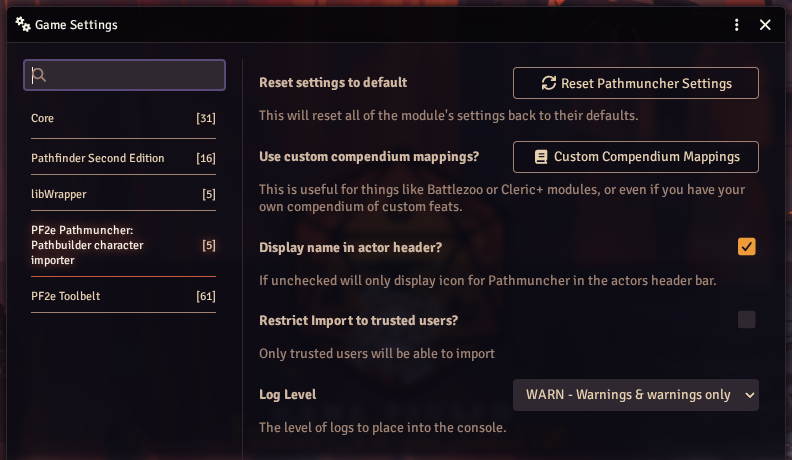
| Setting | Description |
|---|---|
| Reset settings to default | Reset Pathmuncher Settings puts every Pathmuncher setting back to its default, after asking first, then reloads Foundry |
| Use custom compendium mappings? | Custom Compendium Mappings opens Compendium Lookups: choose which compendiums Pathmuncher searches |
| Display name in actor header? | Show "Pathmuncher" next to its icon in the sheet header. Untick to show the icon only. On by default |
| Restrict Import to trusted users? | Only Trusted Players, Assistant GMs and GMs can import. Off by default. Changing it reloads Foundry |
| Log Level | How much Pathmuncher writes to the browser console. Warnings only by default; turn it up when reporting a problem |
The import options are not settings: they are chosen in the importer each time, and remembered for each actor. See Import Options.
Compendium Lookups
Pathmuncher finds everything in a build by searching compendiums. Compendium Lookups chooses which compendiums it searches for each kind of item, and in what order. The first compendium with a match wins.
Use it to search content from other modules, such as Battlezoo Ancestries or Clerics+, or your own compendium of homebrew feats.
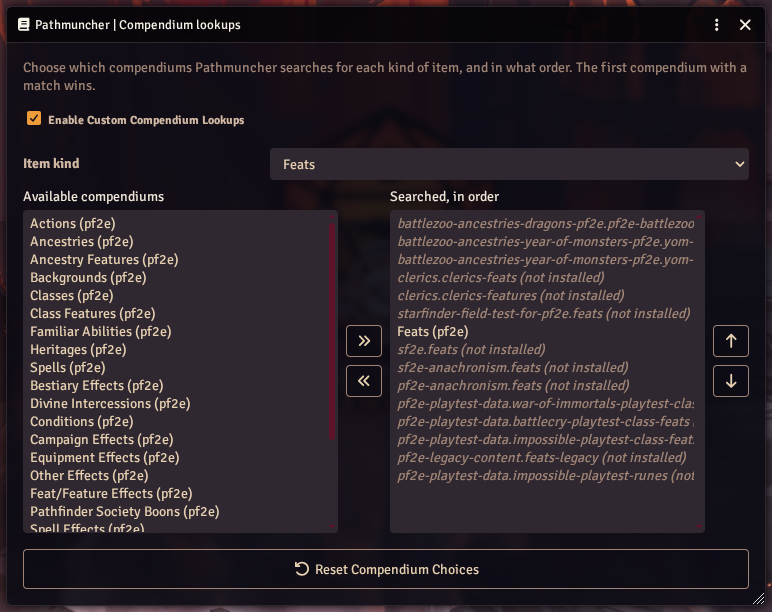
- Tick Enable Custom Compendium Lookups. While it is unticked, Pathmuncher uses its built-in lists, even if you have changed them here.
- Choose an Item kind: Feats, Ancestry Features, Class Features, Actions, Spells, Classes, Ancestries, Heritages, Equipment, Formulas, Deities or Backgrounds.
- Move compendiums between Available compendiums and Searched, in order with the arrow buttons.
- Use the up and down buttons to change the order of the searched list. Put your own compendium first to have it win over the system's.
Changes are saved as you make them. Reset Compendium Choices puts the built-in lists back.
Searched by default
As well as the Pathfinder 2e and Starfinder 2e system compendiums, Pathmuncher searches these modules' compendiums when they are enabled:
- Battlezoo Ancestries: Dragons, and Battlezoo Ancestries: Year of Monsters
- Clerics+
- Starfinder Anachronism (for Starfinder and Pathfinder)
- PF2e Playtest Data
- PF2e Legacy Content
- PF2e Psychic Amps
- Starfinder Field Test for PF2e
Compendiums from modules that are not installed show as "(not installed)", and are skipped.
How names are matched
Pathbuilder and Foundry do not always use the same name for something. Pathmuncher has a list of hundreds of these differences, and tries the Foundry name first, then the Pathbuilder name, in each compendium in turn.
If you find a name it misses, please let us know on GitHub or Discord.