Animal Companions and Eidolons
When the PF2e Companion Compendia module is active and Companions and eidolons is ticked, Pathmuncher builds the character's animal companions, an eidolon, and an inventor's construct companion, as characters of their own. They are built the way that module builds them, so they work with everything it automates.
Without the module, Pathmuncher cannot build companions, eidolons or constructs. They are listed in the import notes under Pets not imported, for you to create by hand.
Where each companion goes
The first time a character is imported with a companion, Pathmuncher asks which character the companion goes to.
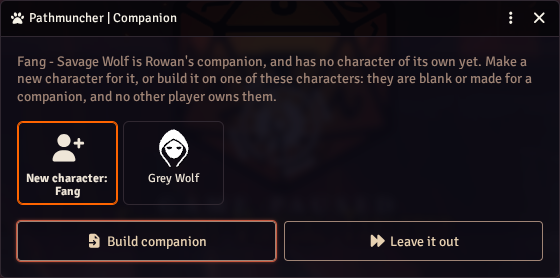
- New character - a new character is made for it, named as in Pathbuilder ("Fang - Savage Wolf" becomes Fang). A companion Pathbuilder gives no name becomes, for example, "Ilsa's Badger". This is picked to start with.
- An existing character - the companion is built on that character instead. Only characters that are blank or already made for a companion are offered, that no other player owns, and that are not already someone's companion.
- Leave it out - the companion is not built, and is listed in the import notes.
If no character qualifies, Pathmuncher makes a new one without asking.
New companions go in a Companions actor folder, and are owned by whoever owns the character.
After that, the companion is linked to its character. Each import finds it and updates it without asking again.
Animal companions
An animal companion gets:
- its animal as its ancestry, which brings the companion class,
- the character's level,
- Mature, Nimble, Savage or the other advancements, as Pathbuilder has them,
- Specialized, with its first specialization chosen, and any other specializations,
- its barding, worn, and any other gear Pathbuilder gives it.
Some animals, such as the horse, can be different sizes. Pathbuilder's export does not say which, so Pathmuncher picks Medium where it can, and lists the choice under Companion choices to check in the import notes.
Eidolons
A summoner's eidolon, or the eidolon of a character with Summoner Dedication, gets:
- its type as its ancestry (Angel Eidolon, Beast Eidolon), which brings the eidolon class,
- the summoner's level, with every eidolon class feature up to that level,
- the eidolon's version of each of the summoner's evolution feats, including those taken through Basic or Advanced Synergy,
- Energy Heart's damage type, and an elemental eidolon's element, from the build,
- for Summoner Dedication, the module's Summoner Dedication Adjustment, which caps its attributes at low levels as the archetype does.
Pathbuilder's export leaves out the rest of the eidolon: its key attribute, its size, its attacks, its attribute boosts and its Transcendence increase. These are made in the eidolon builder.
The eidolon builder
Once the eidolon is made, the eidolon builder opens.
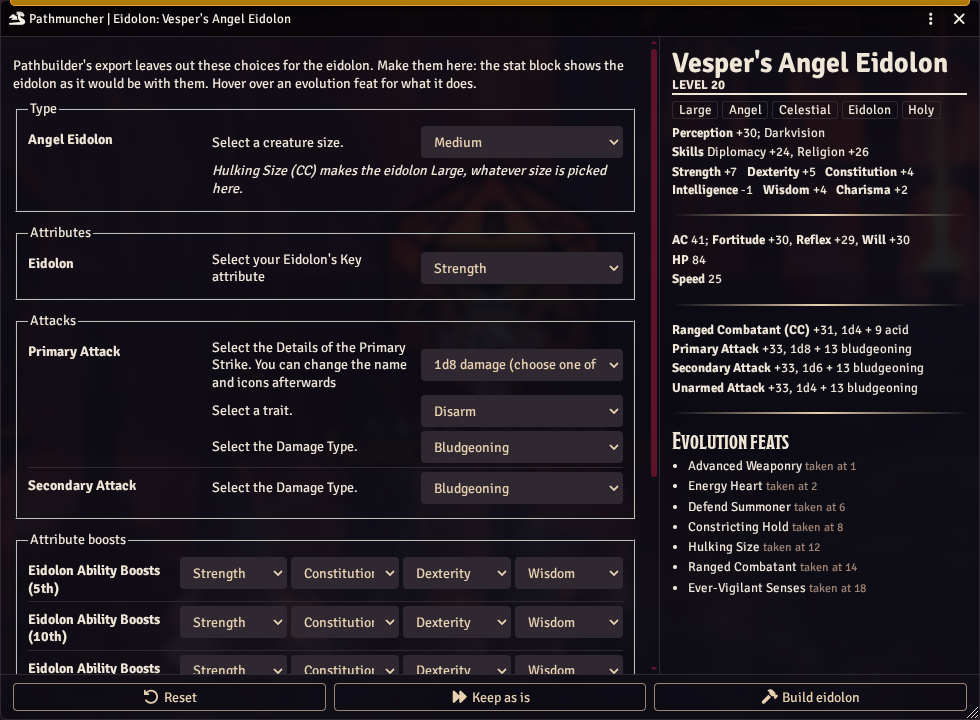
On the left is every choice the eidolon's items make, in sections:
- Type - its size, and an elemental eidolon's kind and element,
- Attributes - its key attribute, which sets its attribute array,
- Attacks - its primary attack's damage die, trait and damage type, and its secondary attack's damage type,
- Attribute boosts - four boosts at each of levels 5, 10, 15 and 20, and the Transcendence increase,
- Evolution feats - the damage types the evolution feats ask for.
On the right is the eidolon's stat block, as it would be with these choices. It updates as soon as you change a choice.
Below the stat block are the eidolon's evolution feats, with the level the summoner took each one at. Hover over one to read what it does.
Some evolution feats set the eidolon's size outright, such as Hulking Size, which makes it Large. The size choice then says so: it only matters until the summoner takes that feat.
Pathmuncher fills each choice in to start with:
- with your earlier answer, if you have built this eidolon before,
- with the build's own answer, where it has one (Energy Heart's damage type, an elemental's element),
- or with a default: Medium, Strength as the key attribute, and the key attribute, Constitution, then Dexterity and Wisdom for each level's boosts.
The buttons along the bottom:
- Reset - puts every choice back as the eidolon has it now.
- Keep as is - closes the builder and keeps the choices the eidolon has. On an import, any choices left at their defaults are listed under Companion choices to check in the import notes.
- Build eidolon - makes the choices on the eidolon.
Walkthrough: building an eidolon during an import
- Import the summoner as usual, with Companions and eidolons ticked.
- If Pathmuncher asks where the eidolon goes, pick New character, or a character you have made for it.
- The summoner is imported, the eidolon is made, and the eidolon builder opens.
- In Type, pick the eidolon's size.
- In Attributes, pick its key attribute. Strength gives a Strength-based array and Dexterity a Dexterity-based one; watch the attribute modifiers, AC and strikes change on the right.
- In Attacks, pick the primary attack's damage die and trait, and the damage type of each attack. The trait only appears for the damage die that takes one.
- In Attribute boosts, pick the four boosts at each level. A level's boosts must all be different, so an attribute already boosted at that level is greyed out in the other three.
- Pick the Transcendence increase.
- Check Evolution feats: Energy Heart's damage type comes from the build, and anything else defaults to its first option.
- Choose Build eidolon.
The import then finishes as usual.
Walkthrough: making a Dexterity eidolon
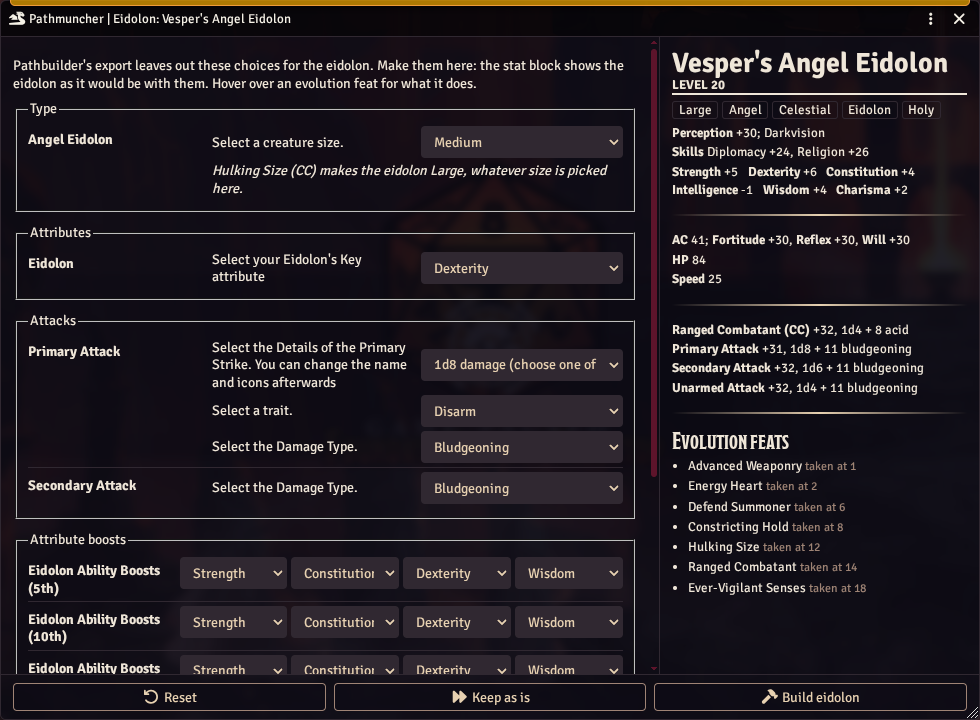
The default is a Strength eidolon. For one that fights with finesse, or a spellcasting eidolon that wants a high Dexterity:
-
In Attributes, change the key attribute to Dexterity. The stat block shows the new array straight away.
-
In Attribute boosts, change each level's first boost from Strength to Dexterity, and pick another attribute in place of Dexterity.
-
Change the Transcendence increase to Dexterity.
-
Check the strikes on the right, then choose Build eidolon.
Walkthrough: changing an eidolon's choices later
-
Open the eidolon's character sheet.
-
Choose Eidolon choices in the sheet's header.

-
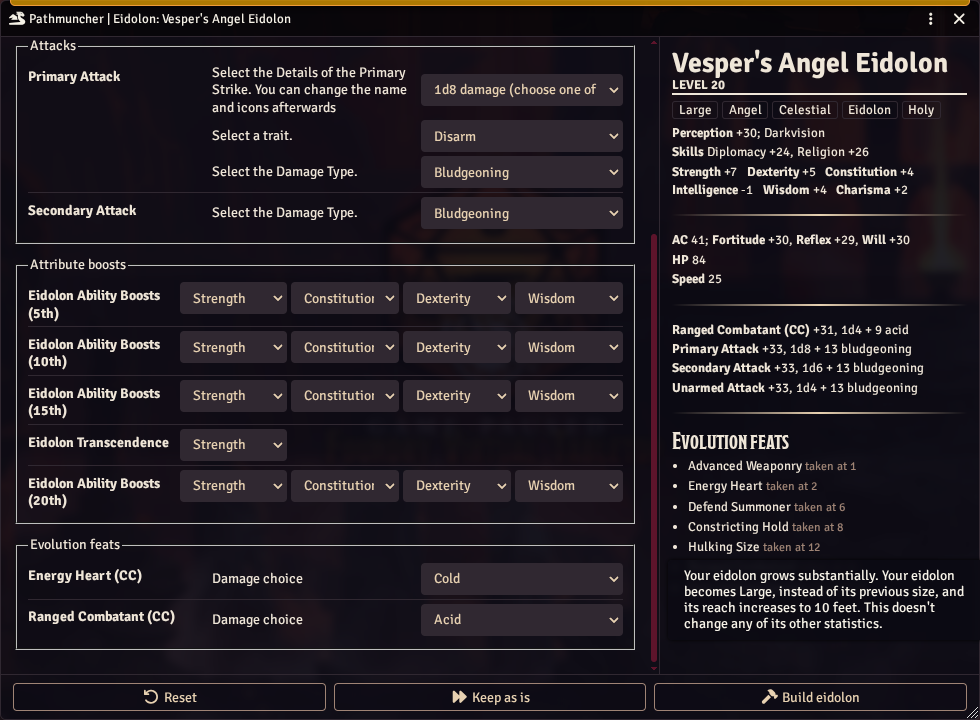
Change the choices you want. The lower sections hold the boosts and the evolution feats' choices. Hover over an evolution feat on the right to read what it does.
-
Choose Build eidolon.
Later imports of the summoner keep the choices you made.
Elemental eidolons
Pathbuilder names an elemental eidolon with its element, such as "Elemental Eidolon (Earth)". Pathmuncher builds it as an Elemental Eidolon with that element. Its kind, Adaptable or Primordial, sets its attribute array, and is chosen in the Type section in place of a key attribute.
Construct companions
An inventor with the construct innovation, or the Prototype Companion feat, gets a construct companion. Pathbuilder's export has no pet for it, so Pathmuncher builds it from the inventor's build:
- the module's Prototype Construct as its ancestry, which brings the construct companion class and its two unarmed attacks,
- the inventor's level,
- Advanced, Incredible and Paragon Construct, for the inventor's Advanced Construct Companion, Incredible Construct Companion and Paragon Companion feats,
- Megaton Strike, when the construct is the inventor's innovation,
- the innovation's initial, breakthrough and revolutionary modifications.
Pathbuilder doesn't export the construct's name, so a new construct is named after its character, such as "Ilsa's Prototype Construct". Rename it in Foundry; later imports keep the name.
Its size, the damage type of its second unarmed attack, and choices its modifications make (Projectile Launcher's damage type) are not in the export either. The first import asks for each, as Foundry does when the item is added. Later imports give the same answers without asking; to change one, change it on the construct's item.
Importing again
Each import finds the companions linked to the character and updates them.
- Everything Pathmuncher made on a companion is replaced from the new build, at the character's new level.
- Anything you added to a companion by hand is kept.
- An eidolon keeps the choices it has, whether you made them in the builder or on its items.
To rebuild a companion on a different character, delete the link by deleting the companion, and import again.
What is not imported
- Evolution feats with no eidolon version - many evolution feats only change the summoner, and need nothing on the eidolon.
- Names Pathbuilder doesn't export - a construct companion's name, and the eidolon's.
- A Summoner Dedication eidolon's limits - the module builds every eidolon with the eidolon class's features up to its level, as a summoner's has them. The archetype's eidolon gains less, through feats such as Expert Combat Eidolon, so remove the features it doesn't have.