Import Options
The importer has three groups of options, below the Pathbuilder character. Each option is a part of the character to import. Untick one to leave that part of the actor alone.
Each group has All and None buttons to tick or untick the whole group at once.
Every option is ticked to start with. After a successful import, Pathmuncher remembers the options you used for that actor, and ticks the same ones next time.
Character
| Option | What it imports |
|---|---|
| Name | The actor's name and its token's name |
| Class | The class, its key attribute, and its class features up to the character's level |
| Ancestry | The ancestry |
| Heritage | The heritage |
| Background | The background |
| Deity | The deity, and the deity check |
Features and spells
| Option | What it imports |
|---|---|
| Feats and class features | Feats, class features and actions |
| Lores | Lore skills, at their proficiency rank |
| Spells | Spellcasting entries, their spells and slots, and the focus pool |
| Adjust for blended spell slots | Applies the Spell Blending changes to spell slots. Only available while Spells is ticked |
| Formulas | Known formulas, added to the crafting tab |
| Familiars | Familiars, created as their own actors (see Familiars) |
| Companions and eidolons | Animal companions, an eidolon and an inventor's construct companion, as characters of their own. Needs the PF2e Companion Compendia module (see Animal Companions and Eidolons) |
Inventory
| Option | What it imports |
|---|---|
| Equipment | Gear, containers, consumables, ammunition and books |
| Weapons | Weapons, with their runes and materials |
| Armor and shields | Armor and shields, with their runes |
| Treasure | Treasure other than coins |
| Money | Coins (or credits and UPBs in Starfinder) |
Some details always come across, whatever is ticked: the character's level, ability boosts, saves, skills, weapon and armor proficiencies, languages, senses, age and gender.
Importing again
Import into the same actor again, for example after levelling up in Pathbuilder, and Pathmuncher updates it in place.
For each ticked option, Pathmuncher deletes the items of that kind it imported last time and adds the new build's. Items of a kind you have unticked are left as they are. Effects, conditions and any other kinds of item are never touched.
To update just one part of a character, such as its inventory after a shopping trip, tick only those options.
Items you added by hand
Pathmuncher marks every item it imports, so it can tell them apart from items you added yourself.
If the import would replace a kind of item that you have added to by hand, Pathmuncher asks before deleting them:
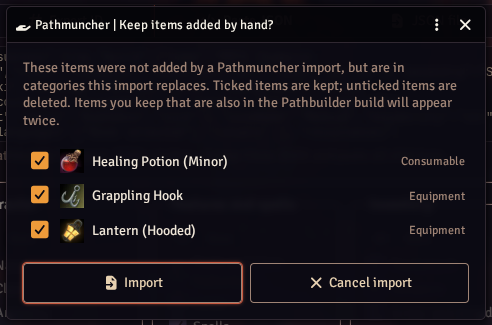
Ticked items are kept; unticked items are deleted. Everything is ticked to start with. An item you keep that is also in the Pathbuilder build appears twice, so untick those.
Characters imported with a much older version of Pathmuncher have no marks on their items. For those, everything in the replaced categories is treated as imported, and this question is not asked.
If an import fails
Nothing on the actor changes until Pathmuncher has worked out the whole build and you have answered its questions. If something goes wrong before then, you see "Pathmuncher could not process this character, so nothing was changed", followed by the error.
If something goes wrong while the actor is being updated, Pathmuncher saves a copy of the character from before the import, as a new actor named "name (pre-import backup)". The error message tells you its name. This is why importing needs the Create New Actors permission.
Please report failed imports on GitHub or Discord, with the character's JSON export.