Introduction
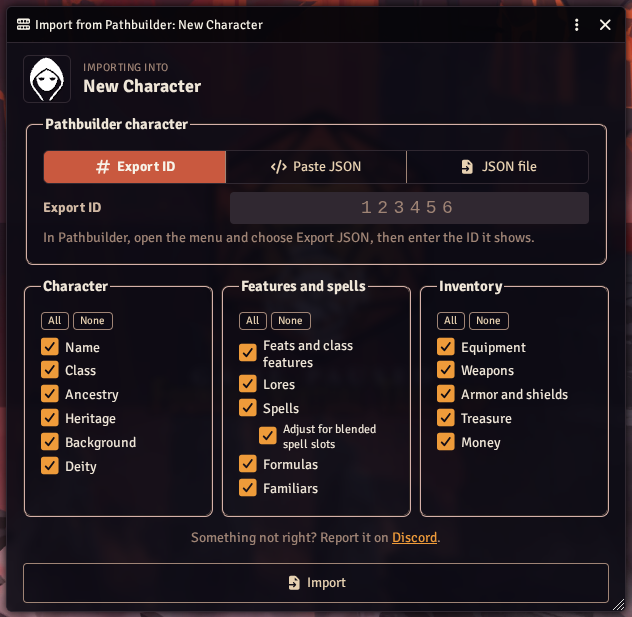
Pathmuncher imports characters from Pathbuilder 2e into Foundry VTT. It works with both the Pathfinder 2e and Starfinder 2e systems, and can also import Starfinder characters exported from Hephaistos 2E.
Pathmuncher finds each part of the build in your compendiums, works out the choices you made in Pathbuilder, and builds the character on an actor in your world. Import the same character again after levelling up, and it updates the actor in place.
New to it? Start with Getting Started.
Highlights
- Three ways to import - by Pathbuilder's export ID, by pasting the JSON, or from a saved JSON file.
- Choose what to import - pick the parts of the character to bring in, from name and class to spells, weapons and money. Pathmuncher remembers your choices for each actor.
- Safe re-imports - items you added by hand are kept if you want them, and nothing on the actor changes until the whole build has been worked out.
- Choices asked up front - anything the export does not answer is asked in one place, before the import starts, rather than in a stream of pop-ups.
- Deity checks - domains, divine font and sanctification that the deity does not allow are caught, with a choice of how to fix them.
- Familiars - familiars are created as their own actors and linked to their master.
- Import notes - a report at the end lists anything that could not be matched, so you know what to check.
- Your own compendiums - search third-party content such as Battlezoo Ancestries or Clerics+, or your own homebrew.
- Starfinder 2e - weapon and armor grades, upgrades, credits and batteries.
Installation
Install Pathmuncher from the Foundry VTT module browser: search for "Pathmuncher" and click Install. Then enable it in your world under Settings → Manage Modules.
Compatibility: Foundry VTT V14, with the Pathfinder 2e or Starfinder 2e system.
Settings are under Settings → Configure Settings → PF2e Pathmuncher. See Settings.
For Developers
- Programmatic API - run imports from a macro or another module, and reuse Pathmuncher's compendium matching.
Help and Bugs
Please open bugs and issues on GitHub, or ask in the #pathmuncher channel on Discord. A shared link to the Pathbuilder character, or its JSON export, makes a problem much easier to track down.