Choices During Import
Pathbuilder's export records most of what you chose when building the character, but not all of it. Where Pathmuncher cannot work something out, it asks you.
All of these questions come before anything on the actor changes. Cancel import in any of them stops the import and leaves the actor exactly as it was.
They appear in this order, and only when they are needed.
Variant rule warnings
In Pathfinder 2e, Pathmuncher compares the build's variant rules with your world's, and warns you if they differ:
- Free Archetype - if the build uses it but the world does not, archetype feats are put in class feat slots where there is room. If the world uses it but the build does not, the archetype slots are left empty.
- Gradual Ability Boosts - if the build uses it but the world does not, boosts taken since the last 5-level step do not apply. If the world uses it but the build does not, check the character's ability boosts after importing.
These are warnings only; the import carries on. To fix one, change the variant in the system settings and import again.
Deity choices
Pathbuilder lets a character pick options that their deity does not allow, whereas the Pathfinder 2e system only offers the ones that it does. When Deity is ticked, Pathmuncher checks the character's:
- domains (including alternate domains, with Expanded Domain Initiate),
- divine font (healing or harmful),
- sanctification (holy, unholy, or neither),
- and a champion's cause, where the cause needs a sanctification.
If any of these do not fit the deity, the Deity choices window lists each problem, for example "Gozreh does not grant the Fire domain." Hover over a deity to see its domains, divine font, sanctification and favored weapons.
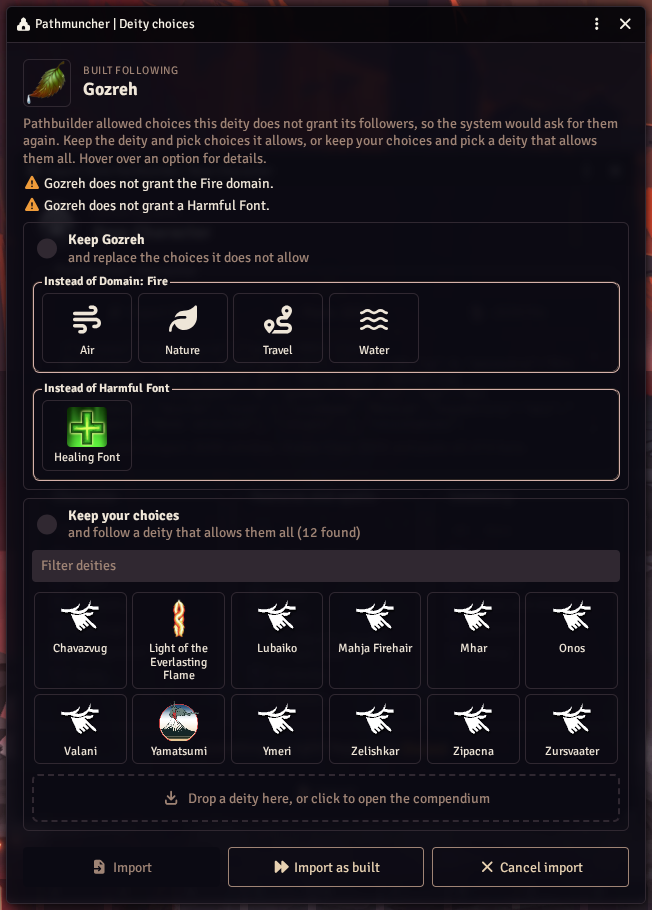
There are two ways to fix it:
- Keep the deity, and replace the choices it does not allow. For each problem, pick one of the deity's own options instead. A domain picked for one problem is greyed out for the others.
- Keep your choices, and follow a deity that allows them all. Pick one from the list of deities that do, which you can filter by name. Or drop any deity onto the box, from a compendium or the Items directory, or click the box to open the deities compendium. If the deity you drop still does not allow everything, Pathmuncher tells you what is left; the system asks for those during the import.
Import is available once you have picked a replacement for every problem, or a deity to follow. Import as built changes nothing, and the system asks you for these choices during the import instead.
Missing ancestry, heritage, background or class
If Pathmuncher cannot find the build's ancestry, heritage, background or class in any of the compendiums it searches, the Missing from compendiums window asks you for it.
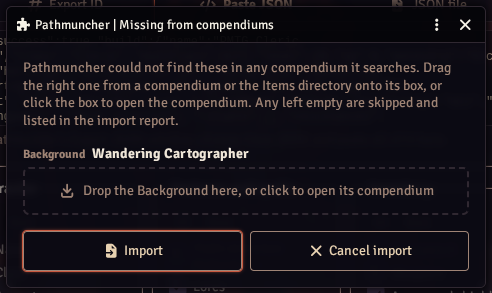
Drag the right item onto its box, from a compendium or the Items directory, or click the box to open the matching compendium. Leave a box empty to skip that item; it is listed in the import notes.
This often means the build uses content from a module that is not enabled, or a homebrew item. If you import from that source often, add its compendium in Compendium Lookups so you are not asked each time.
Ammunition
Pathbuilder lists some ammunition, such as rounds for firearms, just once, where Foundry has a separate kind for each gun.
When the character has only one gun that takes it, Pathmuncher gives that gun all of the ammunition, and does not ask. When there are several, the Ammunition window lets you share it out:
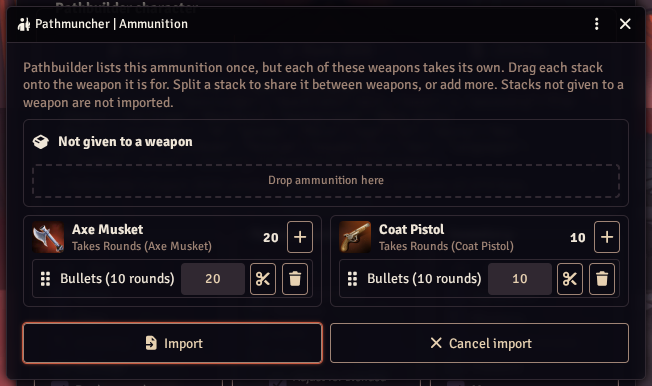
- Drag each stack onto the weapon it is for.
- Change a stack's quantity, or click the scissors to split it in two and share it between weapons.
- The bin removes a stack.
- The + next to a weapon adds a new stack of 10 to it.
Each weapon shows a running total. Stacks left under Not given to a weapon are not imported.
Choices to make
Many feats and features ask you to make a choice: a skill, a weapon, a domain, and so on. Pathmuncher answers these from the build wherever it can, including from the character's skill proficiencies and the items they carry.
Whatever is left, the Choices to make window asks all at once, grouped by the item that asks.
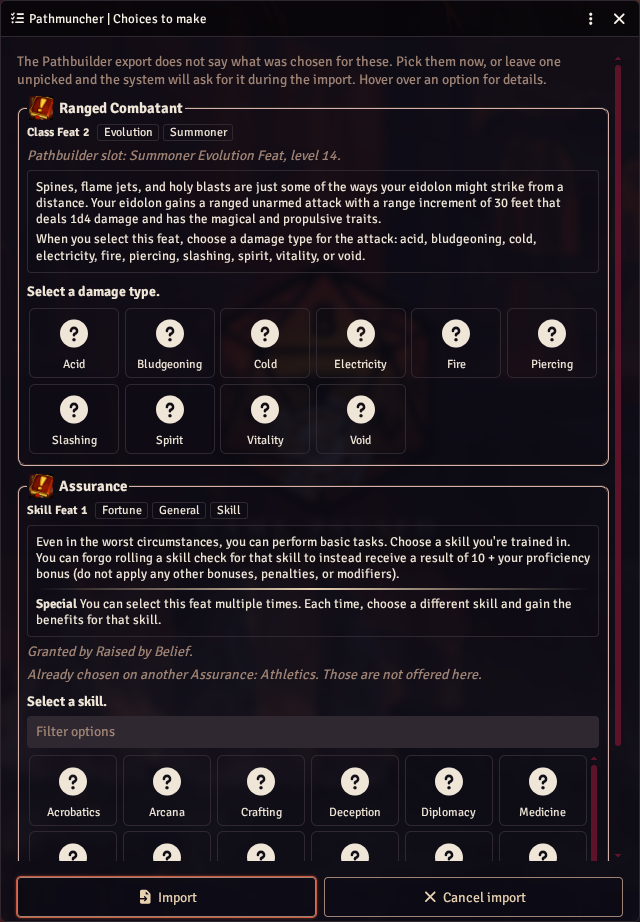
Each group shows what helps you decide:
- the item's kind and level, and its traits,
- where the build took it in Pathbuilder, such as "Pathbuilder slot: Summoner Evolution Feat, level 14",
- its description, which scrolls if it is long,
- what granted the item, if something did,
- and any options already taken by another copy of a repeatable feat, which are not offered again.
The list scrolls when there are many choices, so the buttons stay on screen.
- Click an option to pick it, and hover over it to read its description.
- Long lists have a Filter options box.
- Clear this choice unpicks it.
You do not have to answer them all. Leave one unpicked and the system asks for it during the import, in its usual window.
A few choices that other parts of the build depend on, such as a deity, cannot wait until the end. The system asks for those during the import itself.
Keep items added by hand?
When you import into an actor again, Pathmuncher asks before deleting items you added by hand. See Items you added by hand.